Notion Goal Tracker: Track One Goal With a Free Widget
To track a goal in Notion, use the free Goal Tracker widget for one number, or a database for many goals. The widget fills a thermometer as you add to it. A database lets you list every goal on one page. You can also use both.
Our widget follows one goal at a time. You name it, set a target, and type an amount each time you make progress.
How the Notion goal tracker widget works
The tracker shows the amount so far, the target and the percent reached. A thermometer fills as the total grows.
- Name and target. Type a goal name and the amount you are aiming for.
- Add progress. Type an amount and press Add each time you save more, run further or write another page.
- Pick the unit. Use dollars, euros, pounds or plain numbers. Plain numbers count anything you can add up, such as kilometres, pages or hours.
It is free, needs no account and comes in six styles. See the goal tracker widget catalog or try the Sleek Blue Goal Tracker.
Two of the other styles, Winter and Sleek Blue:
Add it to Notion
- Open a widget in the catalog and press Add to Notion. That copies its link.
- In Notion, paste the link on your page and choose Create embed. You can also type
/embedfirst. - Drag the edges to resize it, then set your goal and target inside the widget.
If an embed shows blank, the beginner guide to adding widgets to Notion has the fixes.
What it is good for
- A savings goal, such as a holiday fund, a deposit or an emergency fund.
- A yearly target you add to bit by bit: kilometres run, pages written, books sold.
- A debt payoff or a no-spend month, where you add each payment as you make it.
What it does not do
It does not connect to a bank, so you type each amount yourself. It saves in your browser, on that device. Notion does not sync it, so what you enter on your laptop will not appear on your phone. And it tracks one goal. For ten goals, use a database.
A goal tracker in a Notion database
If you want every goal in one list, build it by hand.
- On a new page, type
/table viewand make a database called "Goals 2027". - Add a Number property named "Target" and another named "Done".
- Add a Formula property named "Progress" with
prop("Done") / prop("Target"). In the property's settings, show the number as a bar or a ring. - Add a Select property named "Area" and a Status property.
- Add a gallery or board view if you prefer cards to rows.
With five goals in it, the table looks like this.
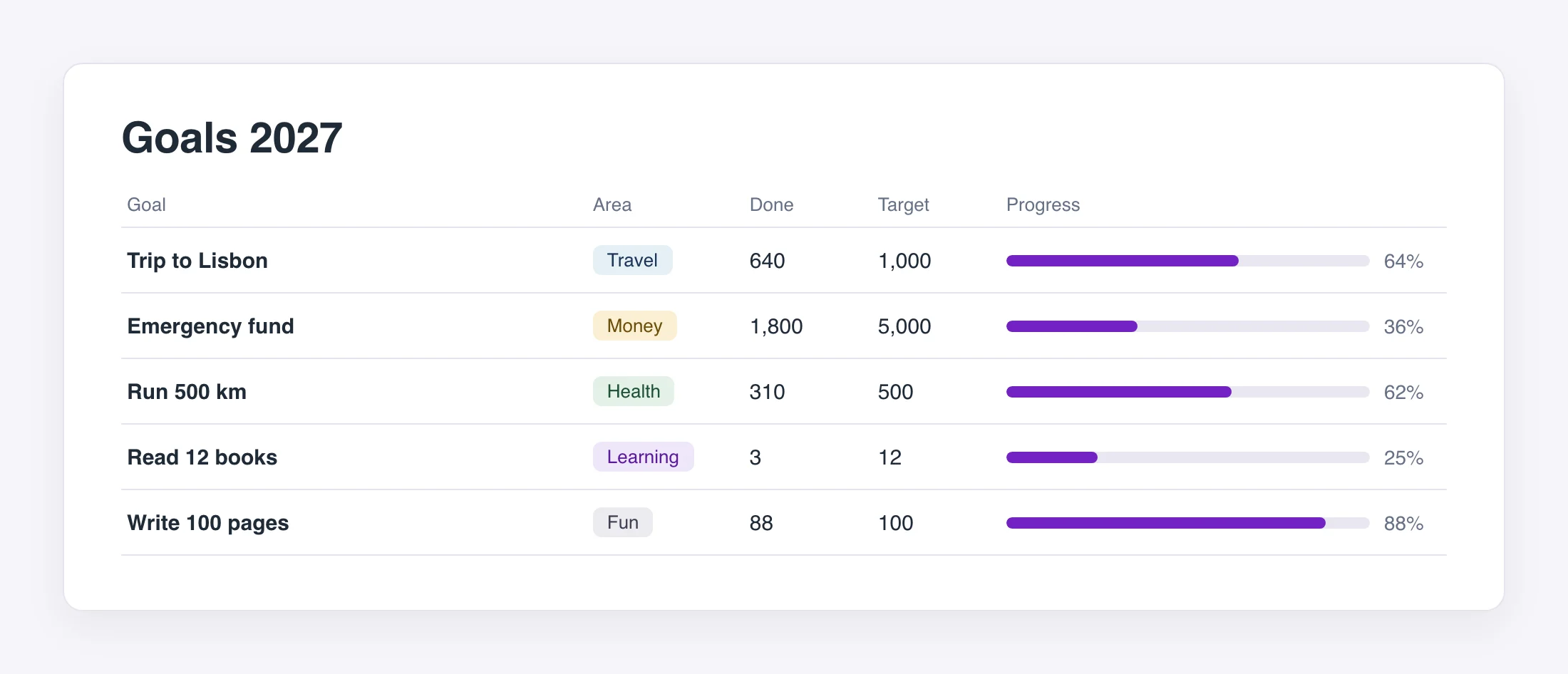
That gives you a goal tracker with a progress bar for each row. It syncs across devices, because it is part of your Notion workspace. The cost is that you update the number by editing a cell.
Goal tracker template or widget?
Notion's template gallery has many goal tracker templates. They are a fast start for a full system with goals, projects and reviews. The widget is the opposite: one number, one glance, no setup. A common setup is a database of all your goals with the widget on top for the goal that matters most.
| Widget | Database | Template | |
|---|---|---|---|
| Goals it holds | One | As many as you add | As many as you add |
| Setup | Paste one link | Five steps | Duplicate, then learn the layout |
| Updating | Type an amount, press Add | Edit a cell | Edit a cell |
| Syncs across devices | No, it saves in your browser | Yes | Yes |
| Cost | Free | Free | Free or paid, by template |
For a page that shows why the goals matter, add a vision board. Our New Year widgets also include a mood tracker and a reading tracker. For time rather than amounts, try a year progress bar.
Questions
Is the goal tracker widget free? Yes. It is free to embed with no account. Views are unlimited, and each copy carries a small Widgets For Notion attribution.
Can I track money? Yes. Pick dollars, euros or pounds and the amounts show as money.
Can I track something that is not money? Yes. Choose plain numbers and it counts kilometres, pages, hours or anything else you can add up.
Where is my progress saved? In your browser, on that device.