Notion Planner for 2027: Build One With Free Widgets
A Notion planner for 2027 is one page that holds your tasks, your calendar and your goals. You can build one yourself in about twenty minutes. This guide uses free widgets for the parts you want to see (a countdown, year progress, a calendar and a goal tracker) and a normal Notion database for the tasks.
None of it needs an account with us, and nothing is a download.
What a Notion planner needs
Most digital planners are four things: a way to see the month, a list of tasks, a few goals, and a sense of how the year is going. Notion is good at the list. It has no built-in countdown, year bar or goal thermometer, so those come from embedded widgets.
Build a Notion planner in six steps
- Make the page. Create a page called "2027 planner". Use a Notion cover if you like.
- Make a top row. Drag one block next to another to create columns. This row will hold your widgets, so keep it to two or three columns.
- Add the tasks database. Under the row, type
/table viewand make a database called "Tasks". Give it a Date, a Status and an Area. Add a Today view filtered on today's date. - Paste the widgets (listed below) into the top row. In Notion, paste a widget's link and choose Create embed. Drag the edges to resize.
- Add a weekly page. Make a small template button for a Sunday review: three bullets, what went well, what to drop and what is next.
- Check it on your phone. Open the page in the Notion app and make sure the columns still read well.
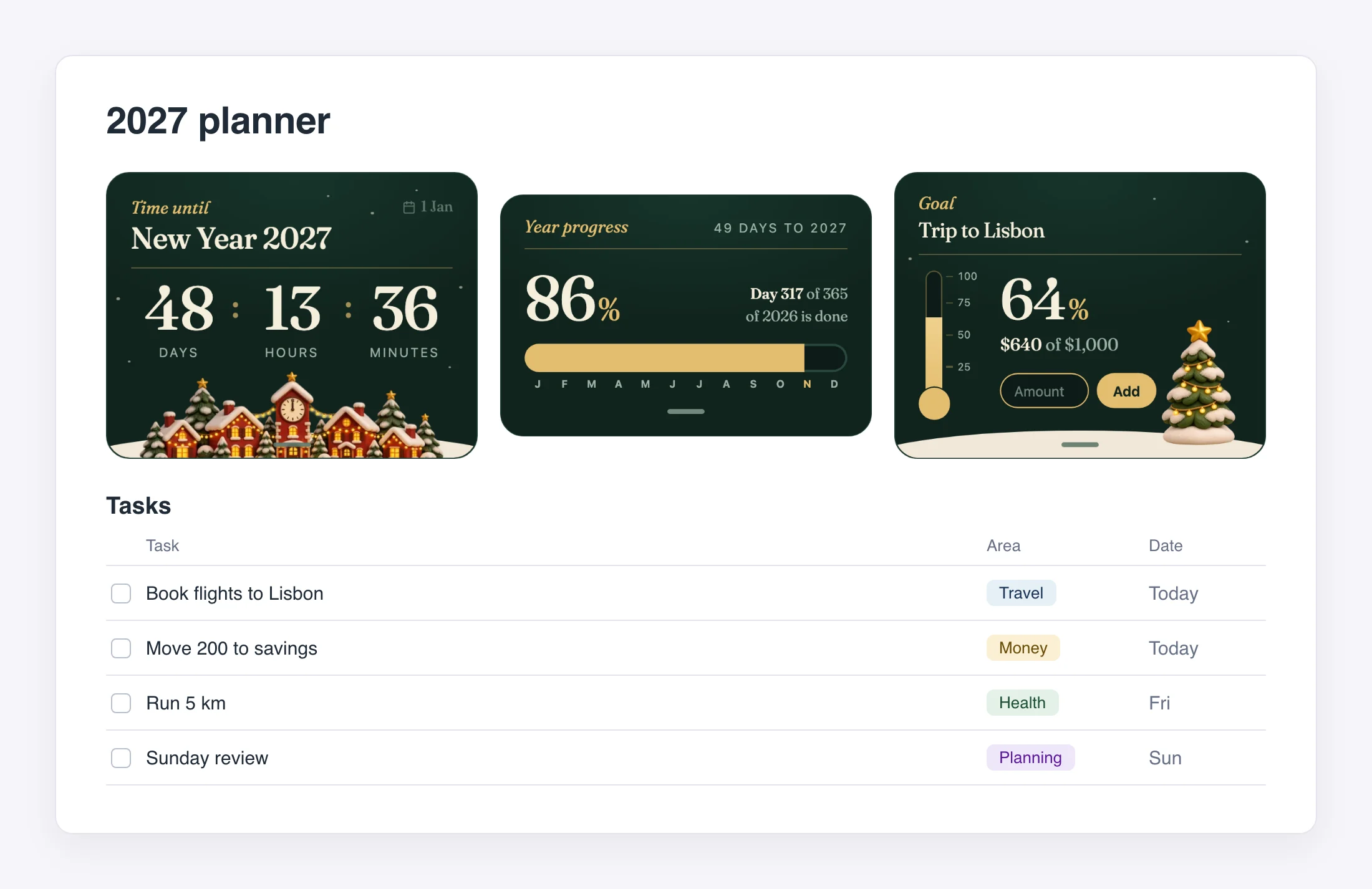
The finished page has the widgets in a row at the top and the tasks under them.
Our beginner guide covers what to do if an embed shows blank.
The widgets to put on it
A countdown to the new year. The New Year Countdown counts the days, hours and minutes to 1 January 2027. Rename it and pick another date for an exam or a trip. It is a good header for the page. See all the countdown widgets.
Year progress. The New Year Progress Bar shows the percent of the year that is done as one bar split into twelve months, with the days left. It needs no setup. When 1 January comes, it starts again.
A calendar. The Sleek Blue Calendar is a monthly view with month navigation. Use it as a picture of the month next to your task list. More styles are in the calendar widget catalog.
A goal tracker. The New Year Goal Tracker follows one number. Set a target, add amounts, and a thermometer fills. It works in dollars, euros, pounds or plain numbers. See how to track a goal in Notion.
| Widget | What it shows | Setup |
|---|---|---|
| New Year Countdown | Days, hours and minutes to 1 January | None. Rename it for another date |
| New Year Progress Bar | Percent of the year done, by month | None |
| Sleek Blue Calendar | The current month | None |
| New Year Goal Tracker | One number against a target | Name the goal and set a target |
Every widget here is free. They also come in other looks in the New Year and Winter collections.
What the widgets do not do
Be clear about the limits, so the planner works.
- They do not hold tasks. Use the database for that.
- The goal tracker saves in your browser. Notion does not sync it, so what you enter on a laptop will not show on your phone.
- The goal tracker follows one goal. For many goals, use a database with a number column.
- Year progress tracks time, not your work. It tells you how much of 2027 has passed, not how much you have done.
If you want a ready-made layout
Notion's own template gallery has many planners you can duplicate, and some are very good. They give you a full set of linked pages quickly, but you then need to learn someone else's setup. Building the page yourself takes a little longer and fits you exactly. You can also duplicate a template and drop our widgets into it.
Questions
Is the planner free? Yes. The widgets on this page are free to embed, views are unlimited, and each copy shows a small Widgets For Notion badge.
Do I need an account? No.
Can I use it for 2028? Yes. The tasks database carries on. The year progress bar starts again each 1 January, and you can set the countdown to any date.
Does it work on mobile? Yes. Embeds show in the Notion app on iOS and Android.