# How to Add a New Year Countdown to Notion
> Put a live New Year countdown on a Notion page in about a minute: copy the widget link, paste it as an embed, and resize it. Free, no account needed.
Source: https://widgetsfornotion.com/blog/new-year-countdown-notion
Published: 2026-11-13T00:00:00.000Z
---
To add a New Year countdown to Notion, copy the link of the free [New Year Countdown widget](/widgets/new-year-countdown), paste it on your page and choose **Create embed**. It opens already counting the days, hours and minutes to 1 January 2027, which is a Friday.
If you only want to watch the clock, the live [New Year countdown page](/new-year-countdown) shows the same count with seconds, and it goes full screen.
**Live preview: [New Year Countdown](https://widgetsfornotion.com/widgets/new-year-countdown)** — interactive on the page.
## Add a New Year countdown to Notion
Notion has no countdown block, so you embed a small page that counts.
1. **Copy the link.** Open the [New Year Countdown widget](/widgets/new-year-countdown) and press **Add to Notion**.
2. **Paste it into Notion.** Paste the link on your page and choose **Create embed**. You can also type `/embed` and paste it there.
3. **Resize it.** Drag the edges of the block until the digits read well.
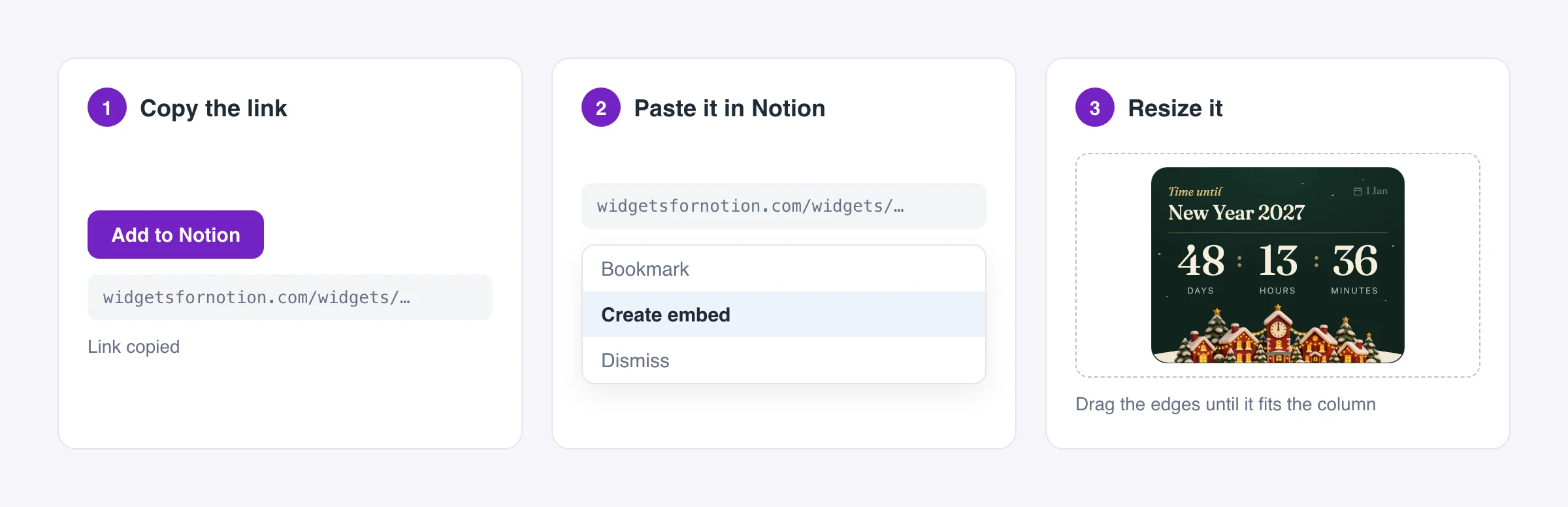 You need no account. If an embed shows blank, our [beginner guide](/blog/how-to-add-widgets-to-notion) covers the usual fixes, and Notion explains the embed block in its [help center](https://www.notion.com/help/embed-and-connect-other-apps).
At midnight the widget shows Happy New Year with three firework bursts.
## The live New Year countdown page
Open the [live New Year countdown](/new-year-countdown) when you want it on a big screen. It shows a line with the days left, the date, and a clock that ticks. Most browsers can show it full screen, which suits a party. Safari on iPhone does not allow full screen for a page like this one.
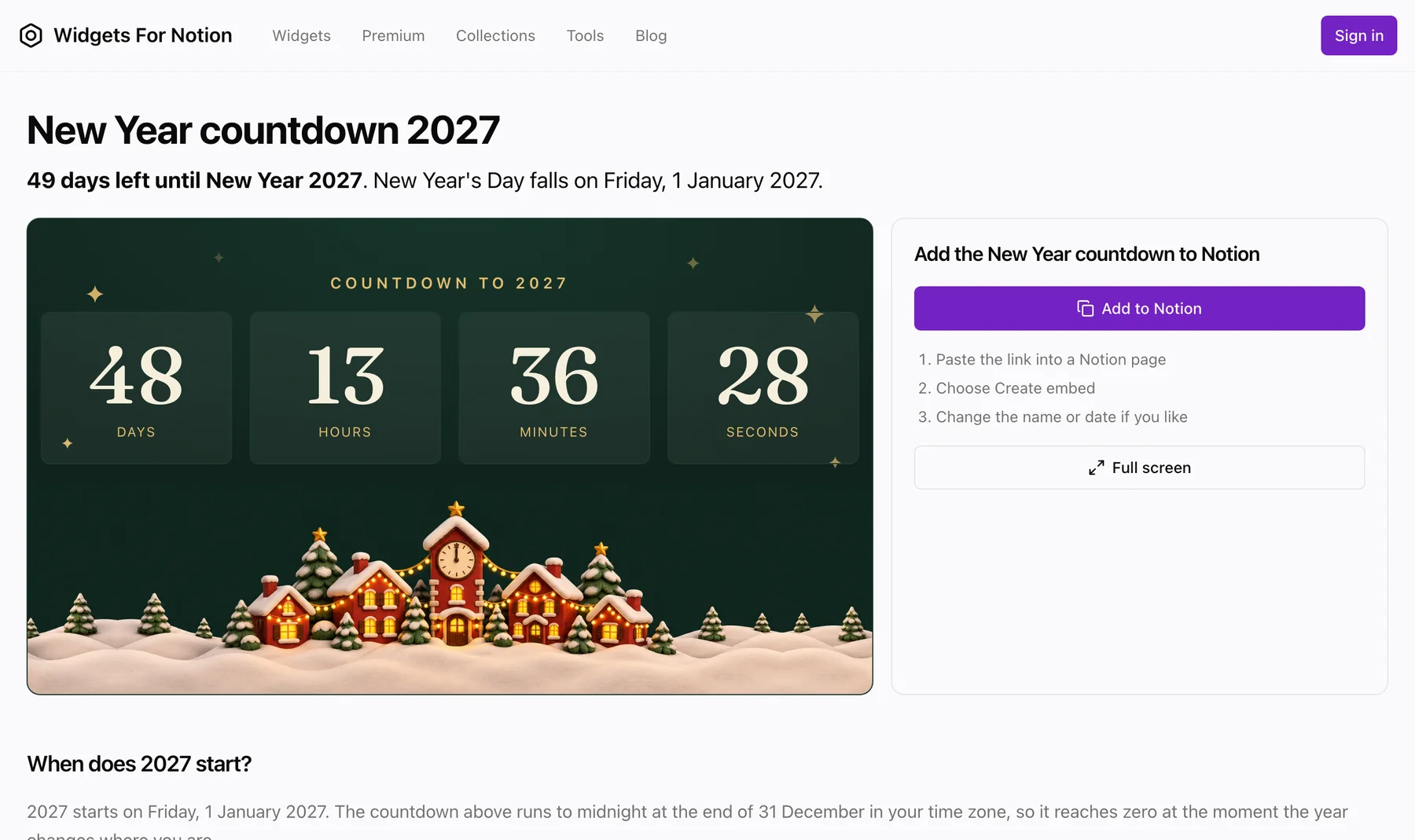 It reaches zero at 00:00 on 1 January in your own time zone, because it follows the clock on your device. Someone in Sydney gets there hours before someone in London. To see another city's midnight, [timeanddate.com](https://www.timeanddate.com/) is a good place to look.
On 1 January the page says Happy New Year. From 2 January it counts to the next one.
## Count down to something else
The widget opens on New Year, but it is an ordinary countdown underneath. Click the event name and type a new one. Pick a date, and it counts to that instead. Use it for a New Year's Eve party, a flight, or a deadline in January.
The widget saves your event in the browser you set it in. Open the page on another device and it starts on New Year again until you set it there too.
## Where to put it
Put the countdown at the top of the page you open most in December, such as a party plan, a year planner or a New Year's Eve guest list. On a page you share, it gives everyone the same number to look at. For a full year page, add the free year progress bar and goal tracker beside it, as in our [Notion planner for 2027](/blog/notion-planner-2027).
## Other styles
The same countdown comes in a few looks. The [Winter countdown to New Year](/widgets/winter-new-year-countdown) is another style, and the [New Year collection](/collections/new-year) and the [Winter collection](/collections/winter) have a goal tracker, a year progress bar, a mood tracker and a reading tracker in the same designs. All of our [countdown widgets](/widgets/types/countdown) are in one catalog.
The Winter and Sleek Blue countdowns, live:
**Live preview: [Winter New Year Countdown](https://widgetsfornotion.com/widgets/winter-new-year-countdown)** — interactive on the page.
**Live preview: [Sleek Blue New Year Countdown](https://widgetsfornotion.com/widgets/sleek-blue-new-year-countdown)** — interactive on the page.
If you want the same thing for Christmas, read [how to add a Christmas countdown to Notion](/blog/christmas-countdown-notion).
## Questions
**Is it free?** Yes. The widget is free to embed, no account is needed, views are unlimited, and each copy shows a small Widgets For Notion badge.
**What day is New Year's Day 2027?** Friday 1 January 2027.
**Does it work on a phone?** Yes. The countdown fits a phone screen, and embeds show in the Notion app on iOS and Android.
**What happens after midnight?** On 1 January it shows Happy New Year. From 2 January it starts counting to the next New Year, unless you picked your own date. With your own date, it shows its end message once that date passes and asks you to pick a new one.